

hoekstra.co.uk
Linux HowTos
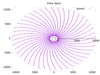
Imagine plotting the series of prime numbers on a polar plot, with both the radius value and the angle value (in radians) of each point being a prime number from this series - what would that graph look like? Bizarrely, a very pretty spiral!
So, do prime number follow a pattern after all, then? The answer is below. In the meantime, here's how you can create a spiral graph and play around with it.

Here is how to quickly create a bootable USB stick using just the standard commands on the Linux command line: We use the dd command and write the .iso file directly to the root of the USB stick.

Complex and useful BASH one-liners. Here's how to:
- Sort a file based on line length
- Determine the longest line in a text file
Believe me, there are some real-world applications where this is required, or else I would not be telling you about it!
The best way to display a consecutive sequence of images in a quick succession is to create an animated GIF. Using an animted GIF instead of a video file means that no video-player plug-ins are required on your browser. Also, many corporate networks have internal network restrictions that prevent video files to pass the firewall, but allow animated GIFs. It is also much easier to embed GIF's in content management systems, such as Joomla, compared to a video file.
Here's how to make an animated GIF from a directory of chronologically-sequenced photos or images using the ImageMagick toolset on Linux.
If you have hundreds of photos or images that you want to display in quick succession, create a video file using these steps on Linux. The result is slightly lossy, which means that there will be some pixilation, but the resulting file is much smaller than if you were to create an animated GIF. A rule of thumb is that 1000 photos will make a 640x480-pixel AVI file of 4.4MB in size and an 8MB-sized Flash video (.flv) file. Here's how to do it, using some fine open source technology in the form of the LIBAV library: